

Fanless Industrial PC
| Also called | Fanless PC, passively cooled PC, fanless embedded computer |
|---|---|
| Cooling method | Conduction and natural convection through the chassis |
| Typical heatsink | Finned aluminum enclosure, often with heat pipes |
| Common processor range | About 6 W to 35 W; up to 65 W in larger chassis |
| Moving parts | None (with solid-state storage) |
| Acoustic noise | Silent |
| Common form factor | Box PC |
A fanless industrial PC is an industrial computer cooled without a fan, using its metal enclosure as a heatsink to carry heat away from the processor. The enclosure releases that heat to the surrounding air. Removing the fan eliminates the most common moving part to fail and stops the computer from drawing dust and moisture through its case.
Fanless designs are the most common type of industrial PC. They are used in factories, vehicles, outdoor enclosures and other places where dust, vibration or temperature extremes would shorten the life of a fan-cooled computer.
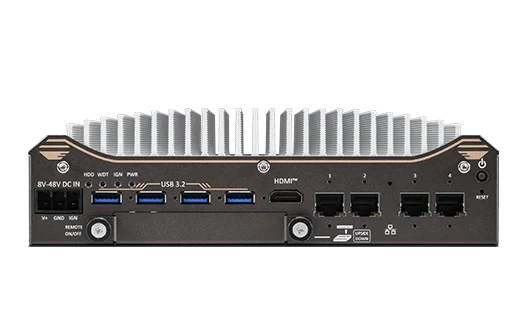
How fanless cooling works
A fan-cooled computer moves air across a heatsink to carry heat away. A fanless computer relies on two slower processes instead:
- Conduction – heat moves from the processor through a thermal pad or paste into a metal block, then into the enclosure. Heat pipes are often used to move heat from the processor to a larger area of the chassis.
- Natural convection and radiation – the warmed enclosure heats the air around it, which rises and is replaced by cooler air. Fins on the enclosure increase the surface area in contact with the air.
Because natural convection removes heat more slowly than a fan, a fanless computer must either produce less heat or have a larger heatsink. Most fanless designs balance both: an efficient processor in an enclosure sized to its heat output.
Processor power
The heat a fanless chassis can dissipate limits the processor it can use. Compact fanless PCs commonly use processors with a thermal design power (TDP) of about 6 W to 35 W. Larger chassis with extensive fins can cool desktop-class processors of up to about 65 W. Some processors can be configured to a lower TDP to fit a fanless design or to widen its temperature rating.
Chassis design
Fanless enclosures are typically machined or extruded aluminum, chosen for its thermal conductivity and low weight. Fins usually run along the top or sides. Some designs place the main board against the top of the enclosure so the hottest components sit directly under the fins.
Advantages
- No fan to fail – fans wear out, and their bearings are affected by dust, vibration and cold. A fanless PC with solid-state storage has no moving parts.
- Sealed against dust – with no airflow through the case, dust and airborne debris stay outside. Many fanless enclosures have no vents at all.
- Wide temperature range – the absence of a fan removes a component that can seize in the cold, which helps fanless PCs achieve wide operating temperature ratings.
- Shock and vibration resistance – fewer moving and loosely mounted parts make the system easier to rate for shock and vibration.
- Silent operation – useful in medical, laboratory, office and public spaces.
- Lower maintenance – no fans or filters to clean or replace.
Limitations
- Performance ceiling – processor power is limited by the chassis. Sustained heavy workloads can cause throttling, especially near the top of the rated temperature range.
- Size and weight – a fanless chassis is larger and heavier than a fan-cooled computer of the same performance, because the enclosure is the heatsink.
- Hot surfaces – the enclosure gets warm to hot during operation. This is normal, but it should not be mounted where people touch it or against heat-sensitive materials.
- Expansion limits – add-in cards, especially GPUs, add heat. Fanless systems with expansion slots usually limit the power of installed cards. Systems with high-power GPUs typically use a fan.
- Installation sensitivity – fanless cooling depends on air reaching the fins. Mounting position and clearance affect how well it works.
Installation
Because a fanless PC depends on natural airflow, how it is mounted affects its temperature:
- Leave clearance around the fins, as specified in the manufacturer's manual.
- Mount in the orientation the manufacturer specifies. Fins oriented vertically let warm air rise freely; some ratings apply only in a particular orientation.
- Avoid enclosing the computer in a small sealed cabinet unless the cabinet's internal temperature stays within the computer's rating.
- Keep it out of direct sunlight, which adds heat the rating may not account for.
- Do not stack other heat-producing equipment directly against the fins.
Comparison with fan-cooled industrial PCs
| Attribute | Fanless | Fan-cooled |
|---|---|---|
| Moving parts | None (with SSD storage) | One or more fans |
| Dust ingress | Sealed; no air drawn through | Air drawn through the case; filters may be needed |
| Processor power | Usually up to about 35 W; up to about 65 W in large chassis | Up to desktop and workstation class |
| Discrete GPUs | Limited to low-power cards, if any | Full-power GPUs possible |
| Maintenance | Minimal | Fan and filter cleaning or replacement |
| Noise | Silent | Audible fan noise |
| Size for a given performance | Larger | Smaller |
Some manufacturers offer hybrid designs: a fanless chassis with an optional, easily replaced fan module for higher-power processors or GPUs.
Applications
- Factory automation – machine control and data collection on dusty or oily production floors
- In-vehicle computing – fleet, transit, mining and agricultural vehicles, where vibration would wear out a fan
- Outdoor enclosures – traffic systems, utilities, EV charging and telecom cabinets
- Food and pharmaceutical processing – areas where airborne contamination must be avoided
- Digital signage and kiosks – enclosed spaces where silence and low maintenance matter
- Edge computing and machine vision – low- and mid-power inference in unconditioned spaces
Frequently asked questions
What is a fanless PC?
A fanless PC is a computer that has no cooling fan. Heat is conducted from the processor into a finned metal enclosure, which releases it to the surrounding air. With solid-state storage, a fanless PC has no moving parts.
Do fanless PCs overheat?
A fanless PC operated within its rated temperature range, in its specified orientation and with the required clearance, is designed not to overheat. Under heavy sustained load near the top of its range, the processor may throttle, reducing its speed to stay within safe temperatures.
Is it normal for a fanless PC to get hot?
Yes. The enclosure is the heatsink, so it is expected to be warm or hot to the touch during operation. The manufacturer's manual gives the expected surface temperature and the clearance needed around the unit.
Are fanless PCs slower than fan-cooled PCs?
For the same processor, a fanless PC can run at full speed as long as its chassis can remove the heat. Fanless designs are usually built around lower-power processors, so the fastest fan-cooled systems outperform the fastest fanless ones, especially for GPU-heavy workloads.
Can a fanless PC have a GPU?
Some can, with low-power graphics cards or integrated graphics and AI accelerators. High-power discrete GPUs produce more heat than a fanless chassis can usually remove, so systems built around them typically use fans.
Why are fanless PCs used in dusty environments?
A fan pulls air, and the dust in it, through the computer. Dust builds up on components and fans, raising temperatures and causing failures. A sealed fanless enclosure keeps dust outside.
See also
- Industrial computers
- Wide-temperature industrial PCs
- Box PCs
- Thermal throttling
- IP ratings for industrial computers