

Box PCs
| Also called | Embedded PC, embedded box PC, embedded computer, industrial box PC |
|---|---|
| Type | Industrial computer form factor |
| Display | None built in; drives external displays |
| Typical cooling | Fanless; fan-assisted in high-power models |
| Typical power input | Wide-range DC, e.g. 9–48 V |
| Mounting | Wall, DIN rail, VESA, desk, vehicle frame |
| Size range | Palm-sized to several liters |
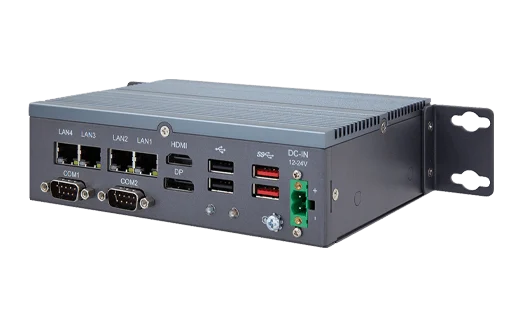
A box PC, also called an embedded PC, is an industrial computer built into a compact, self-contained enclosure with no built-in display or keyboard. It is mounted near the equipment it controls or monitors, often inside a machine, cabinet or vehicle, and connects to sensors, cameras, controllers and displays through its ports.
The box PC is the most common industrial computer form factor. Most are fanless, run from DC power, and run standard operating systems such as Windows IoT Enterprise and Linux.
Characteristics
- Headless design – no integrated screen. A box PC may drive one or more external displays, or run with no display at all as a controller or gateway.
- Sealed enclosure – usually a metal chassis that also serves as the heatsink. Most are fanless.
- Industrial I/O – in addition to USB, Ethernet and video, box PCs commonly offer serial ports, isolated digital I/O, CAN bus and Power over Ethernet.
- DC power – a wide-range DC input accepts vehicle or cabinet power directly.
- Flexible mounting – brackets for walls, DIN rails, VESA mounts and vehicle frames.
- Long availability – models typically remain in production for several years so equipment builders can standardize on them.
Categories
Box PCs span a wide range of sizes and performance levels. Common categories include:
| Category | Typical processors | Typical uses |
|---|---|---|
| Ultra-compact | Intel Atom, Intel N-series, Arm | IoT gateways, data loggers, simple HMI, protocol conversion |
| Compact | Intel Core mobile (U-series), N-series | Machine control, edge data collection, signage, in-vehicle computing |
| Expandable | Intel Core desktop-class | Systems that need PCIe or mezzanine expansion cards, multi-camera vision, motion control |
| GPU and edge AI | Intel Core with discrete GPU; NVIDIA Jetson | Machine vision, AI inference, autonomous vehicles and robotics |
| In-vehicle | Range of platforms | Fleet telematics, transit, mining and agricultural equipment; adds ignition control and vehicle certifications |
I/O layout
Box PCs place their ports on one or two faces of the enclosure. Designs with all ports on the front are easier to wire in a cabinet; designs with ports on front and rear can fit more connectors. Some ports are commonly supplied with locking features, such as screw-lock Ethernet or M12 connectors, so cables stay connected under vibration.
Many box PCs accept internal expansion through M.2 or mini PCIe slots for wireless modules, storage or AI accelerators. Expandable models add full-size PCIe slots or manufacturer-specific modular I/O.
Mounting
- Wall mount – brackets attached to the chassis, the most common option.
- DIN rail – a clip for the standard 35 mm rail used in control cabinets.
- VESA – mounts the computer to the back of a monitor or a VESA arm.
- Vehicle mount – brackets, sometimes with shock isolation, for installation in vehicles and mobile equipment.
- Rack shelf – some box PCs can be placed on a shelf in a 19-inch rack.
Comparison with other form factors
| Form factor | Display | Main difference from a box PC |
|---|---|---|
| Panel PC | Built-in touchscreen | Combines computer and operator display in one unit; used where a local HMI is needed |
| Rackmount industrial PC | None | Larger 19-inch rack chassis with more expansion; usually fan-cooled and AC-powered |
| Consumer mini PC | None | Similar size but uses commercial-grade components, fan cooling, a fixed DC adapter and a short model life |
| Single-board computer | None | A bare circuit board; needs an enclosure and power design before deployment |
Applications
- Factory automation – machine control, data collection, and connections between PLCs and higher-level systems
- Machine vision – inspection systems connected to industrial cameras
- In-vehicle computing – fleet management, transit information, mining and agriculture
- Edge computing and IoT gateways – collecting and processing sensor data on site
- Digital signage and kiosks – driving one or more displays from a hidden location
- Infrastructure – traffic control, utilities, EV charging and telecom cabinets
Frequently asked questions
What is a box PC?
A box PC is a compact, self-contained industrial computer with no built-in display. It is mounted near the equipment it serves and connects to displays, sensors, cameras and controllers through its ports. Most box PCs are fanless and run from DC power.
What is the difference between a box PC and an embedded PC?
The terms are generally used interchangeably. "Embedded PC" emphasizes that the computer is built into a larger machine or system; "box PC" describes its enclosure.
What is the difference between a box PC and a panel PC?
A panel PC has a built-in touchscreen and serves as an operator interface. A box PC has no display of its own and is often mounted out of sight, connected to a separate display if one is needed.
Can a box PC run Windows?
Yes. Most x86 box PCs run Windows 10 or 11 IoT Enterprise as well as Linux distributions. Arm-based box PCs typically run Linux.
How is a box PC different from a consumer mini PC?
A consumer mini PC is designed for desks and offices. A box PC uses components rated for wider temperature ranges, accepts wide-range DC power, offers industrial I/O and mounting options, is tested for shock and vibration, and stays available for several years.
See also
- Industrial computers
- Fanless industrial PCs
- Panel PCs
- GPU and edge AI computers
- Wide-range DC input