

Panel PC
| Also called | Industrial panel PC, touch panel PC, HMI panel PC |
|---|---|
| Type | Industrial computer form factor |
| Display | Built-in touchscreen, commonly 7 to 24 inches |
| Touch types | Resistive, projected capacitive |
| Typical front protection | IP65 or higher |
| Mounting | Panel cutout, VESA, open frame |
| Typical cooling | Fanless |
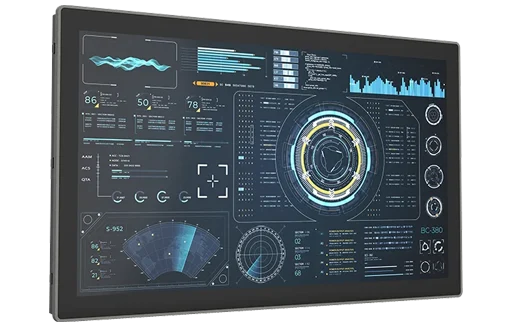
A panel PC is an industrial computer and touchscreen display in one housing, typically mounted in a machine or cabinet with only its sealed front exposed. Panel PCs are used as operator interfaces, or human–machine interfaces (HMIs), for monitoring and controlling equipment.
Combining the computer and display in one unit saves space and wiring compared with a separate box PC and monitor, and gives a single sealed surface facing the operator.
Design
A panel PC contains a computer board, storage and power circuitry behind an LCD with a touch sensor. Most are fanless, with the rear of the housing acting as the heatsink. The front is a flat bezel or a true-flat glass surface sealed against dust and liquids; the rear, which sits inside the cabinet or machine, usually carries the I/O ports and power input.
Panel PCs run standard operating systems such as Windows IoT Enterprise and Linux, so they can run HMI and SCADA software, web-based dashboards and custom applications.
Touch technologies
| Attribute | Resistive | Projected capacitive (PCAP) |
|---|---|---|
| How it senses | Pressure brings two flexible layers into contact | A finger changes the electric field in a grid behind the glass |
| Multi-touch | Usually single touch | Multi-touch, including gestures |
| Gloves and styluses | Works with any glove or stylus | Works with thin gloves; thick gloves need a tuned controller |
| Water on the screen | Generally unaffected | Can cause false touches unless water rejection is built in |
| Surface | Plastic film; can scratch | Glass; scratch-resistant and easy to clean |
| Image clarity | Slightly reduced by the extra layers | Higher |
Resistive touch remains common where operators wear heavy gloves. Projected capacitive touch is now standard for new designs that need a smartphone-like experience, a sealed glass surface or multi-touch.
Ingress protection
Main article: IP ratings for industrial computers
Panel PCs are rated for protection against dust and water using IP codes defined in IEC 60529.[1] Many are rated only at the front, for example "IP65 front", because the rear is meant to sit inside a protected enclosure. The front rating applies when the unit is installed in a correctly sized cutout as specified by the manufacturer.
| Rating | Dust | Water | Typical use |
|---|---|---|---|
| IP65 | Dust-tight | Water jets from any direction | Factory floors, general washdown of the front panel |
| IP66 | Dust-tight | Powerful water jets | Heavy washdown, outdoor exposure |
| IP67 | Dust-tight | Temporary immersion | Equipment that may be submerged briefly |
| IP69K | Dust-tight | High-pressure, high-temperature water jets | Food, beverage and pharmaceutical processing with hot, high-pressure cleaning |
IP69K is defined in ISO 20653 for road vehicles rather than in IEC 60529, but is widely used to describe equipment that survives high-pressure, high-temperature cleaning.[2] In North America, NEMA enclosure types, such as Type 4X, are also used.
Fully sealed panel PCs
Panel PCs for food processing and other washdown areas are often sealed on all sides, with a stainless steel housing, no exposed screws or crevices where contaminants can collect, and sealed M12 connectors. These are usually mounted on a VESA arm or pedestal rather than in a cutout.
Display
- Size and aspect ratio – common sizes range from about 7 to 24 inches. Widescreen (16:9 or 16:10) is now typical; 4:3 and 5:4 remain available for replacing older equipment.
- Brightness – indoor displays are typically a few hundred nits. Displays for outdoor or sunlit use are sometimes over 1,000 nits and are described as sunlight-readable.
- Optical bonding – bonding the touch glass directly to the LCD removes the air gap, reducing reflections and preventing condensation behind the glass.
- Viewing angle – IPS-type panels keep colors readable from the side, useful where operators view the screen at an angle.
Mounting
- Panel mount – the unit is inserted from the front into a cutout and clamped from behind. The front seal depends on the cutout dimensions and the clamping.
- VESA mount – a standard four-hole pattern on the rear for arms, pedestals and wall brackets.
- Open frame – a unit without a front bezel, built into a custom enclosure by a machine or kiosk builder.
- Rack mount – some panel PCs are made to fit 19-inch racks.
Panel PC vs. box PC with a monitor
| Attribute | Panel PC | Box PC + industrial monitor |
|---|---|---|
| Space | One unit | Two units, with a cable between them |
| Wiring | Power and I/O to one device | Power to both, plus a video and touch cable |
| Upgrades | Replacing the computer means replacing the display | Computer and display can be replaced separately |
| Computer location | Behind the screen | Can be placed away from the operator, in a protected cabinet |
| Multiple displays | One built-in display | Can drive several displays |
Applications
- Machine HMI – operator screens on packaging, CNC, plastics and assembly machines
- Process control – local control stations in chemical, water and energy plants
- Food and beverage – washdown-rated stations on processing lines
- Warehousing and logistics – workstations, forklift terminals and dock stations
- Kiosks and self-service – ticketing, check-in and information terminals
- Healthcare and laboratories – easy-to-clean terminals at points of care
Frequently asked questions
What is a panel PC?
A panel PC is an industrial computer combined with a touchscreen in one housing. It is usually mounted in a cutout in a machine or cabinet and used as an operator interface.
What is the difference between a panel PC and an HMI?
An HMI is any operator interface to a machine. Some HMIs are dedicated terminals that run only the manufacturer's HMI software. A panel PC is a full computer that can run HMI software along with other applications on a standard operating system.
What does "IP65 front" mean?
It means the front of the panel PC is dust-tight and protected against water jets when correctly installed in a cutout. The rear is not rated to the same level and is expected to be inside a protected enclosure.
Which touchscreen is better for gloves?
Resistive touchscreens work with any glove. Projected capacitive touchscreens work with thin gloves and, with a tuned controller, with some thicker work gloves.
Can a panel PC be used outdoors?
Yes, if it has a high-brightness, sunlight-readable display, a suitable IP rating on all exposed sides and a wide operating temperature range. Direct sun can raise the internal temperature well above the air temperature.
See also
- Industrial computers
- Box PCs
- Fanless industrial PCs
- IP ratings for industrial computers
- Rugged tablets
References
- IEC 60529, Degrees of protection provided by enclosures (IP Code). International Electrotechnical Commission.
- ISO 20653, Road vehicles – Degrees of protection (IP code) – Protection of electrical equipment against foreign objects, water and access. International Organization for Standardization.